I have been working on the web performance of a major European e-commerce website for the past year. When I first started, the site had a combined JavaScript bundle of 1.4 MB — nearly six times the ~250 kB that Webpack recommends as a warning threshold. The site was also heavy on unoptimised images.
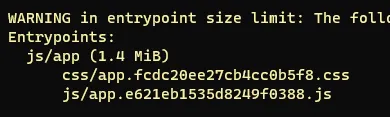
After roughly 4–8 hours per week of research, testing, and squeezing work into an otherwise full sprint backlog, we got the bundle below 500 kB. Lighthouse performance scores hovered around 50 at that point.
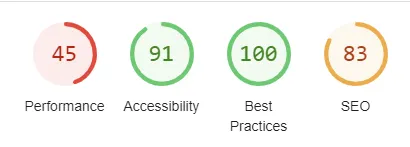
This post shares the key lessons I learnt before diving into the detailed guides that follow. Consider it required reading before you start.
Set up measurement before you touch any code
This is the mistake I made: I started optimising before I had a proper baseline. I have no Lighthouse numbers from before the work began, which makes it impossible to quantify the total improvement convincingly.
Before writing a single line of code, set up performance tracking. Services worth looking at:
- treo.sh and speedcurve.com — paid, but give you continuous real-user monitoring and historical data.
- Speedlify — free, self-hosted on Netlify, runs Lighthouse on a schedule.
If you can, translate performance into money. Conversion rate lift per 100 ms of LCP improvement is well-documented. Having a business case makes it much easier to get budget for tooling and time.
Get your team on board early
I also made the mistake of doing most of the work alone. By the time the numbers were looking good, my colleagues had not followed the journey and were not particularly impressed by the results. The online team was barely aware of the gains.
Performance work touches design decisions (font choices, image sizes), marketing decisions (number of third-party scripts), and infrastructure decisions (CDN, caching). None of those are decisions a single developer can make alone. Involve stakeholders early and keep them updated regularly.
Core web vitals is not just about removing jQuery
This is probably the most important lesson. When I started, I assumed the main wins would come from obvious things: remove jQuery, defer a few scripts, compress some images. That assumption was wrong.
The real work turned out to be:
- Code splitting — breaking the monolithic bundle into route-level chunks so pages only load what they need.
- Replacing obsolete dependencies — libraries that had been added years ago and never revisited, some of which pulled in hundreds of kilobytes for minimal functionality.
- Third-party script negotiation — going to management and arguing for removing or deferring analytics, A/B testing, and tracking scripts that were silently destroying LCP and TBT scores.
- Font loading strategy — the site used a custom font loaded synchronously, which blocked rendering on every page.
None of these are quick wins. Each one required research, testing, stakeholder alignment, and careful rollout.
What comes next
The follow-up post — A practical guide to improve your core web vitals — goes into the specific techniques I used, with concrete before/after numbers. If you are about to start a performance project, read that post alongside this one.
The short version: go in with realistic expectations, measure everything from day one, and treat it as a long-term initiative rather than a sprint task.


